
Disclosure: This post contains affiliate links. If you click through and make a purchase, I may earn a commission at no extra cost to you. I only recommend tools I personally use and trust.
In my last post, I walked through how to sign up for your first affiliate program and get your unique referral links. But when I first started with affiliate marketing, I froze once I had those links in hand. Stick them at the top and readers will think you’re just shilling. Bury them at the bottom and no one will see them. Hide them and you’re breaking the rules.
Early on, I stuffed links into posts the wrong way and even got called out by readers for being too salesy. After testing dozens of approaches, I figured out what works: learn how to place affiliate links naturally — put them where readers expect them, and be upfront about what they are. Do it right, and readers won’t mind; they’ll even click on purpose.
In this guide, I’m breaking down exactly where to place affiliate links, how to write them so they feel authentic, and the compliance rules you can’t skip.
The Truth About Readers and Affiliate Links
Readers don’t hate you for making money with affiliate links. They hate two things:
- You pretending you’re not making anything
- You shoving links in their face every other paragraph
Think about it: if you asked a friend which web host they use, and they said “I use this one, it works great, here’s the link” — would you care if they got a small commission? Probably not. You trust their recommendation because it’s based on real experience.
The same rule applies online. The two keys to natural affiliate links are context and transparency.
The 4 Best Places to Put Affiliate Links
Don’t scatter links randomly. Drop them only where readers are already looking for a recommendation. These 4 spots convert best and feel the least intrusive — once you master how to place affiliate links naturally, these positions become second nature.
1. At the Conclusion of a Product Review
People read reviews to find out what you actually recommend. State your final verdict, explain why, then add your link right after. It feels like a natural next step, not a sales pitch.
Example you can copy:
All things considered, I use Hostinger for my own beginner sites. I’ve been using it for close to a year now with no major issues, the dashboard is in plain English, and support is fast. Their entry plan is cheap and perfect for new bloggers.
If you want to try it, you can use my link here — you pay the same price, I earn a small commission.
2. Inside a Tutorial, Where You Recommend a Tool
When you’re walking someone through a process (like migrating your WordPress site) and mention a specific tool or plugin, add the link right there in the step. Readers are following along and need the tool — they’ll click because it’s useful, not because you’re selling.
Example you can copy:
For this SEO step, I use the Rank Math plugin. It’s full-featured and easy for beginners to set up with the built-in setup wizard. You can check it out here.
3. Inside a Comparison Table
If you’re comparing multiple products side by side, add a link next to each product name. Readers who want to learn more can click; others can just read the comparison. No pressure, no interruption.
You don’t need fancy buttons — just add “(official site)” after the product name and link the text. Simple and clean.
4. In a Resource Roundup at the End of the Post
Wrap up your post with a short “tools mentioned in this post” section and list all your links in one place. Readers who made it to the end and agree with your advice are ready to buy — they’ll appreciate not having to scroll back up.
Quick note: For pure “resource list” or “toolkit” posts, you can put links at the top. For regular tutorials and reviews, stick to in-context placement and an end-of-post list. No need to put them everywhere.
💡 Pro tip: For a 1,000-word post, 3–5 affiliate links is plenty. More than that and readers will notice. Less is almost always more.
3 Golden Rules for Writing Affiliate Links That Feel Natural
Before we get into the rules, let’s cover the core principle behind how to place affiliate links naturally without feeling like a sales pitch.

Getting the position right is half the battle. How you write the link matters just as much if you want to master how to place affiliate links naturally. These are the three rules I follow every time.
1. Provide Value First, Link Second
Never lead with “buy now” or “limited time deal.” First explain what the product does, what problem it solves, and how it’s worked for you. Only add the link once the reader already sees the value.
2. Disclose Clearly That They Are Affiliate Links
A lot of new bloggers hide this, thinking it will hurt clicks. It actually does the opposite. Being upfront builds trust, and readers respect the honesty.
You don’t need a long paragraph. A short line works:
This post contains affiliate links. If you purchase through my link, I earn a small commission at no extra cost to you.
Put it at the top of your post, or right next to the first link. Either is fine — just make sure it’s easy to find.
3. Only Recommend Products You’ve Actually Used
“I’ve used this for months and it’s been solid” beats “this is a great product” every single time. One is a real recommendation from experience; the other sounds like a generic ad.
If you haven’t used it yourself, don’t recommend it. Readers can tell the difference.
3 Common Affiliate Link Mistakes to Avoid
Even if you know how to place affiliate links naturally, it’s easy to fall into these three common traps that erode reader trust.
I’ve made all of these, and I see new bloggers make them every week when they’re still figuring out how to place affiliate links naturally. Save yourself the trouble.
Mistake 1: Link stuffing
Packing a dozen links into a short post makes it look like a spam site, not a real blog. Readers will leave immediately.
Mistake 2: Hidden links
Making links the same color as regular text, or burying them where no one can see them, doesn’t just convert poorly — it’s a compliance risk.
Mistake 3: Failing to disclose
This is the big one. In the US, the Federal Trade Commission (FTC) requires clear disclosure of affiliate relationships. Get caught hiding links, and you could face fines. On Google, undisclosed paid links can hurt your SEO rankings or even get your site removed from search results.
Even if you mostly post on social media and don’t care about Google SEO, you should still disclose. It’s honest, it’s required in most countries, and it actually builds trust with your audience.
The Technical Side: Add rel=”sponsored nofollow”
There’s one quick technical step you should do with every affiliate link: add the rel="sponsored nofollow" attribute.
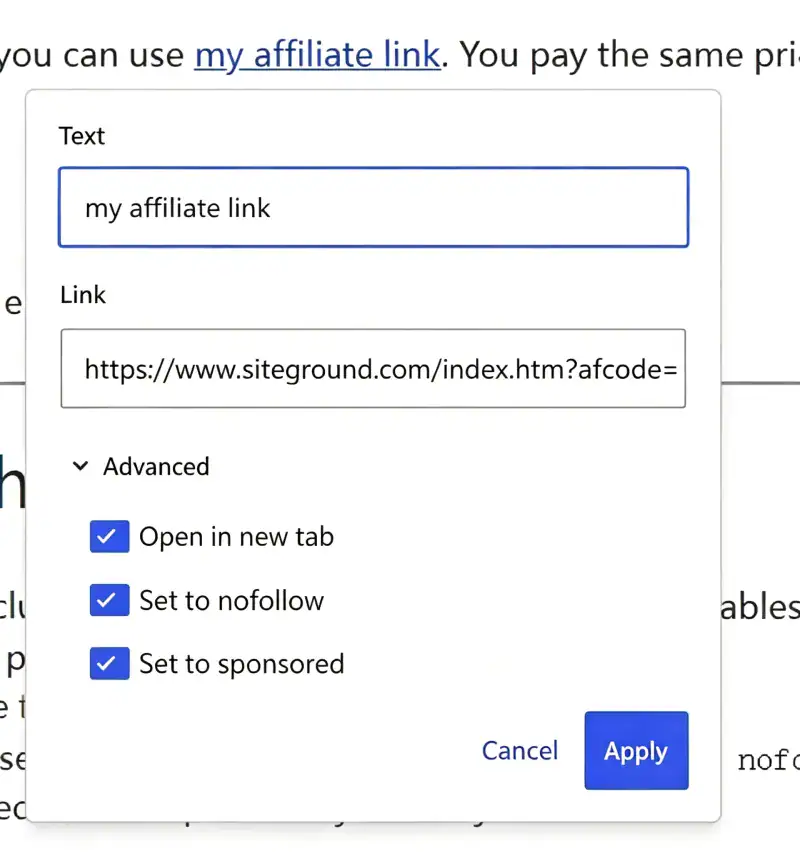
This tells Google: “This is a paid/advertising link, don’t count it as a regular editorial link.” It keeps you on Google’s good side and protects your overall SEO.
Here’s the exact code format:
<a href="YOUR-AFFILIATE-LINK" rel="sponsored nofollow">Product Name</a>If you use WordPress, you don’t have to edit code manually. When you insert a link, just check the “sponsored” and “nofollow” boxes in the link settings. SEO plugins like Rank Math or Yoast can also set this automatically for affiliate links.
Side-by-Side Comparison: Bad vs. Good Affiliate Links
❌ Bad (salesy, no trust)
Best web hosting ever! Click here to buy, exclusive deal!
✅ Good (natural, trusted)
I’ve used Hostinger for close to a year on my beginner blogs. Load times are solid for basic sites, the backend is easy to navigate, and support replies quickly. Entry plans are cheap — great for learning the ropes.
If you want to give it a try, you can use my affiliate link. You pay the same price, and I get a small commission that helps support this blog. Thanks!
The difference: value first, real experience, and full transparency.
Quick Recap Checklist
- Right places: review conclusions, tutorial tool mentions, comparison tables, end-of-post roundups
- Right quantity: 3–5 links per 1,000 words; fewer is better
- Right order: deliver value first, add link second
- Right compliance: disclose affiliate links clearly + use
rel="sponsored nofollow" - Right foundation: only recommend products you use yourself
Frequently Asked Questions
Is it better to put affiliate links at the top or the bottom?
It depends on the post. For list posts and resource roundups, top is fine. For tutorials and reviews, put links in context and at the end. The best spot is wherever the reader is already ready to take action.
How many affiliate links per post is too many?
3–5 is the sweet spot for a standard blog post. It’s better to have a few well-placed links than a ton of ignored ones. More links does not equal more sales.
Will readers stop clicking if I disclose affiliate links?
No. Good readers don’t mind affiliate links — they mind being tricked. The more honest you are, the more people will trust and support you. Hidden links that get discovered are what kill clicks.
How do I place affiliate links naturally in a WordPress post?
Use the block editor’s link tool, add your affiliate URL, and check the “sponsored” and “nofollow” boxes. Place the link on relevant product names or action phrases — never on “click here” alone. Aim for in-context placements that match what the reader is already looking for.
Final Thoughts
At the end of the day, learning how to place affiliate links naturally is all about balancing monetization with a good reader experience.Once you make it a habit to lead with value and keep recommendations relevant, learning how to place affiliate links naturally becomes much easier.
Now that you know how to place affiliate links naturally, it doesn’t have to feel tricky or sleazy. It’s just like recommending a product to a friend in real life: explain why you like it, be clear about the relationship, and don’t push it.
Your homework today: Go back to one of your older posts. Find an affiliate link that feels forced, and rewrite it using the rules in this post.
Next time, I’ll break down how to write a product review that actually generates affiliate sales — from opening hook to final call to action, based on what’s worked for me.
If you found this useful, subscribe so you don’t miss the next one.